
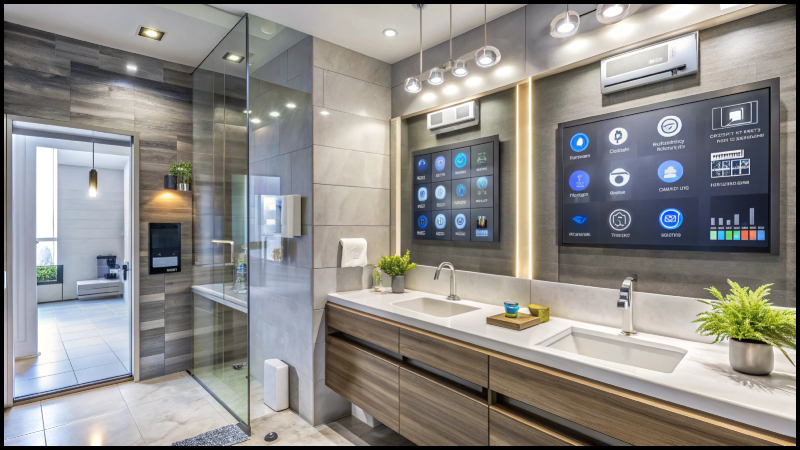
You buy a smart speaker, two smart bulbs, and a camera. A month later your living room has white cables on the wall, a blinking hub on the shelf, and three apps on your phone that never talk to each other. The house is “smart,” but it looks worse than before.
This is where most people go wrong. They treat technology and decor as two separate projects. Smart Home Decoradtech fixes that by treating them as one plan: every device you add should also look good and make daily life easier.
This guide shows you how to do that, step by step, without overspending.
What Smart Home Decoradtech Really Means
Smart Home Decoradtech is a design approach that blends home decor with connected technology. The goal is not to fill rooms with gadgets. The goal is a home where lighting, temperature, sound, and security respond to your routine, while the room still feels warm and personal.
Think of it as two questions asked together:
- Does this device solve a real problem for me?
- Does it fit the look of this room?
If a device fails either question, skip it. A smart home that looks like an electronics store is not good design, and a beautiful room with devices that keep disconnecting is not smart.
Start With Rooms, Not Gadgets
Most buyers pick products first and then hunt for places to put them. Reverse that order.
Walk through each room and write down one daily annoyance:
- Bedroom: harsh overhead light at night, or a cold room in the morning
- Living room: too many remotes, uneven lighting for movie nights
- Kitchen: dark work areas, forgotten appliances left on
- Entrance: fumbling for keys, no idea who is at the door
Each annoyance points to a device that earns its place. A list like this keeps your Smart Home Decoradtech plan focused, and it stops impulse purchases that end up in a drawer.
Lighting: The Biggest Upgrade for the Least Money
If you change only one thing, change your lighting. Light shapes how a room feels more than furniture or paint does.
Layer your lights. Use three types in every main room: ambient (general), task (reading, cooking), and accent (shelves, art, wall washing). Smart bulbs and strips let you control each layer separately.
Use warm tones in the evening. Cooler white light suits mornings and work hours. Warmer light suits dinner and relaxing. Set schedules so the shift happens on its own.
Try LED strips in hidden spots. Behind a TV unit, under kitchen cabinets, or along a ceiling edge, they add depth without showing the hardware.
Create scenes. A “Movie” scene might dim the main light to 20% and turn on a soft strip behind the screen. A “Dinner” scene might warm the dining lamp. One tap replaces five switches.
In a good Smart Home Decoradtech setup, lighting does double duty: it works as decor and as automation.
Hide the Technology, Show the Design
Visible cables and bulky hubs ruin a clean room faster than anything else. A few simple habits help:
- Use cable channels or paint-matched raceways along walls instead of leaving wires loose.
- Place hubs and routers inside open shelves or cabinets. Wi-Fi passes through wood and fabric far better than through metal or thick concrete, but test the signal before you close anything up.
- Choose devices in neutral finishes such as white, black, or brushed metal that match your existing hardware.
- Pick smart switches and plugs over extra gadgets. A smart plug on an ordinary lamp gives you automation and keeps the lamp you already love.
- Style around speakers and displays. A smart speaker on a wooden tray with a plant beside it looks intentional, not accidental.
If a device must be visible, make it look chosen. A good thermostat or doorbell can pass as part of the design.
Smart Comfort: Heating, Cooling, and Curtains
Comfort is where smart technology gives you the most daily value.
Thermostats learn your schedule or follow one you set. Lowering the temperature when nobody is home can reduce energy use, though savings depend on your climate, insulation, and habits, so treat any promised percentage with caution.
Smart curtains or blinds open with sunrise and close at the hottest part of the day. They protect furniture and fabrics from fading and cut heat gain in summer. Motorized tracks look best with simple, floor-length curtains in natural fabrics.
Smart fans and air purifiers can run on timers or react to air quality. Choose models with clean shapes, since these sit in the open all day.
Choose One Ecosystem and Stick to It
This is the technical rule that saves the most frustration. Devices from different brands often fail to cooperate unless they share a standard. Before buying, check which platform your phone and household already use, then look for devices that support it. Many newer products support Matter, a standard designed to let devices from different makers work together, but compatibility still varies by product, so read the box and the manufacturer’s notes before you buy.
A quick checklist:
- Pick your main platform (Google Home, Apple Home, Amazon Alexa, or another).
- Confirm every new device lists support for it.
- Make sure your Wi-Fi covers the whole home, or add a mesh system.
- Keep firmware updated, and change default passwords.
Security matters as much as style. Cameras, locks, and doorbells deserve strong passwords and two-factor authentication. A beautiful home with weak security is a poor trade.
Budgeting a Smart Home Decoradtech Project
You do not need to do everything at once. A phased plan keeps costs under control and lets you learn what you actually use.
Phase 1: Foundation. A reliable router or mesh system, a few smart bulbs, and smart plugs for lamps.
Phase 2: Comfort. A smart thermostat, motorized blinds in the rooms that get the most sun, and a voice assistant.
Phase 3: Security and polish. A video doorbell, smart lock, and any accent lighting or sensors.
After each phase, live with the setup for a few weeks. Notice which automations you use daily and which you ignore. Spend your next budget on the ones that proved useful.
Real-Life Scenes That Work
Here are three setups that deliver value without much fuss:
- Morning routine: Curtains open slowly at 7:00, warm lights rise to 40%, and the kitchen speaker reads the day’s schedule.
- Leaving home: One button turns off lights, lowers the thermostat, and locks the door.
- Evening wind-down: Overhead lights dim, accent strips turn amber, and the TV area lights up softly.
Start with one routine and refine it. Automations that feel natural get used. Automations that feel clever but intrusive get switched off.
Common Mistakes in Smart Home Decoradtech Projects
Watch out for these:
- Buying everything at once. You will not know what you need yet.
- Ignoring Wi-Fi strength. Weak coverage makes devices lag and drop.
- Choosing looks over compatibility, or the reverse. You need both.
- Over-automating. If guests cannot turn on a light without an app, you have gone too far. Keep physical switches working.
- Forgetting privacy. Position indoor cameras carefully and read each device’s data policy.
- Skipping the “what if the internet fails” test. Essential functions like lights and locks should still work manually.
Final Takeaway
The best smart homes do not feel high-tech. They feel calm, comfortable, and easy to live in. Smart Home Decoradtech works when you start from your daily routine, choose a small number of well-matched devices, hide what you can, and style what you cannot.
Before you buy anything, pick one room and one annoyance. Solve that problem with one device that suits the room’s look, then live with it for two weeks. If it earns its place, move to the next room. That slow, deliberate pace builds a home that looks good, works reliably, and fits you, instead of a pile of gadgets chasing a trend.

Fiza Shakoor is a passionate writer who shares practical ideas about home improvement, decor, and everyday living. She focuses on simple, comfortable, and organized home ideas that are easy to understand and apply. Her writing covers DIY projects, home makeovers, storage solutions, and interior and exterior design. Through her articles, Fiza aims to help readers create beautiful and functional spaces with practical ideas. She believes that a well-designed home should be comfortable, organized, and suitable for everyday life.